
Billing & Subscriptions
nunq uses a seat-based licensing model. This page covers subscription management, payment, and plan options.
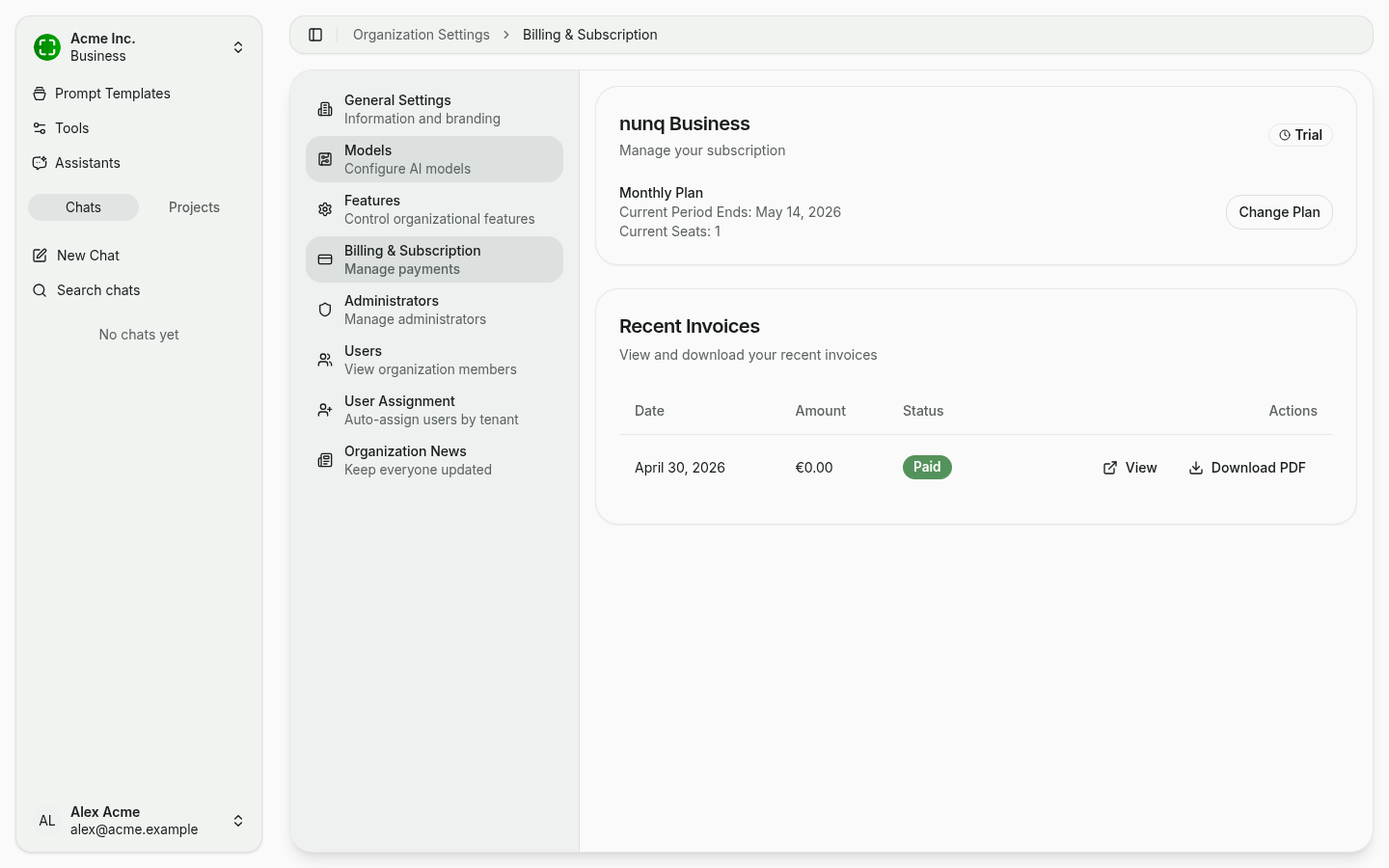
Anatomy of the Billing Page
The billing page shows:
- Plan card with the current plan name (e.g. nunq Business), a status badge (e.g. Trial), monthly/yearly billing, the end of the current period and the number of currently allocated seats. Use Change Plan to open the Stripe customer portal.
- Recent Invoices as a table with date, amount, status (e.g. Paid), and actions to view or download the PDF.
Subscription Plans
nunq offers different subscription tiers to match your organization's needs. Each plan includes a set number of user seats and access to platform features. Contact your nunq representative or visit the pricing page for current plan details.
Trial Period
New organizations start with a trial period that provides full access to the platform. During the trial:
- All features are available.
- A limited number of seats are included.
- The remaining trial period is shown by the Trial badge on the plan card.
When the trial expires, you will need to upgrade to a paid plan to continue using the platform.
Upgrading to a Paid Plan
To upgrade from a trial to a paid subscription:
- Navigate to Organization Settings → Billing & Subscription.
- Click Change Plan.
- Choose your desired plan and number of seats.
- Complete the payment process through Stripe.
Managing Your Subscription
Subscription management is handled through Stripe. From the billing page, you can:
- View your current plan and its details.
- Change your plan to upgrade or downgrade.
- Update payment methods (credit card or other supported methods).
- Access the Stripe customer portal for detailed account management.
Invoices and Payment History
All invoices are generated by Stripe and can be accessed from the Recent Invoices table or the Stripe customer portal. Click View to open an invoice in your browser, or Download PDF for a local copy. Invoices include:
- Subscription charges
- Seat count and per-seat pricing
- Billing period
- Tax information (where applicable)
Seat-Based Licensing
Each user in your organization occupies one seat. Your subscription defines the maximum number of seats available.
- To add more users, you may need to purchase additional seats.
- Reducing seats takes effect at the next billing cycle.
- See User & Role Management for details on managing users and seats.
Billing Frequency
nunq supports two billing options:
- Monthly billing: Pay each month. Offers flexibility to adjust your plan.
- Yearly billing: Pay annually at a discounted rate compared to monthly billing.
You can switch between monthly and yearly billing from the billing settings page.